See it in action
Why AI Dictionary?
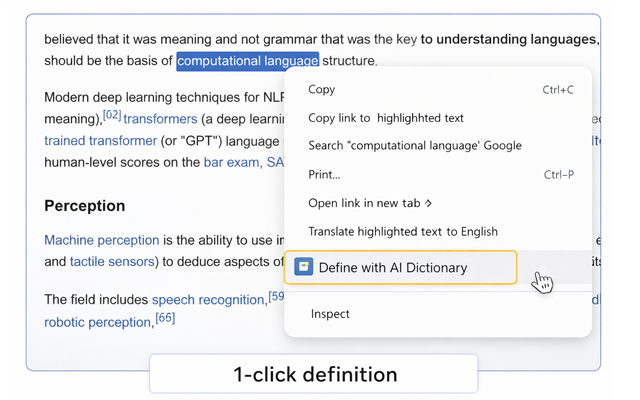
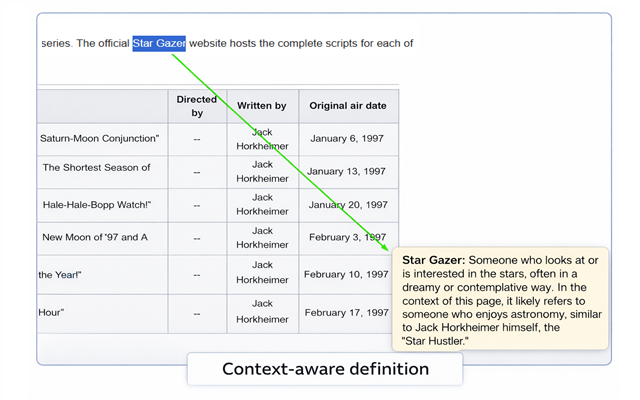
Stop switching tabs to look up words. AI Dictionary is a Chrome extension that adds a Define with AI Dictionary option to your right-click menu. Select any word or phrase, click once, and get a clear, context-aware explanation — right on the page you're reading.
Perfect for learners, researchers, professionals, and anyone who reads online.
Install Free on ChromePricing
Free
$0
- 20 lookups per month
- Context-aware AI definitions
- Quick-access pop-up
Pro
$4.99 / month
- 500 lookups per day
- Synonyms, examples & translations
- Vocabulary history
- Custom popup themes
Coming soon:
Lifetime
$49 one-time
- Unlimited AI definitions (fair use)
- All Pro features forever
- Priority feature requests
- Early access to updates
Frequently asked questions
How do I install AI Dictionary on Chrome?
Click the Install Free on Chrome button above. You'll be taken to the Chrome Web Store — click Add to Chrome and confirm. The extension is ready immediately; no account or login needed.
How many free definitions do I get per month?
The free plan includes 20 definitions per month. The counter resets on the first day of each calendar month.
What AI model powers the definitions?
Definitions are generated by Google Gemini, giving you accurate, context-aware explanations rather than static dictionary entries.
Does it work on all websites?
AI Dictionary works on virtually any webpage where you can select text. A small number of browser-internal pages (like chrome:// URLs) are restricted by Chrome itself.
How do I upgrade to Pro?
Click the extension icon in your toolbar and choose Upgrade. You'll be taken to this page with your device automatically identified, so your upgrade is linked instantly after payment.
What happens if I clear my browser data?
Your device key is stored in Chrome's extension storage, which is separate from cookies and browsing history. Clearing regular browser data won't affect your key. If you uninstall and reinstall the extension, contact us and we'll transfer your Pro access.
Contact
Have questions, feature ideas, or want team pricing?
Email: contact at wkfteam.ru